

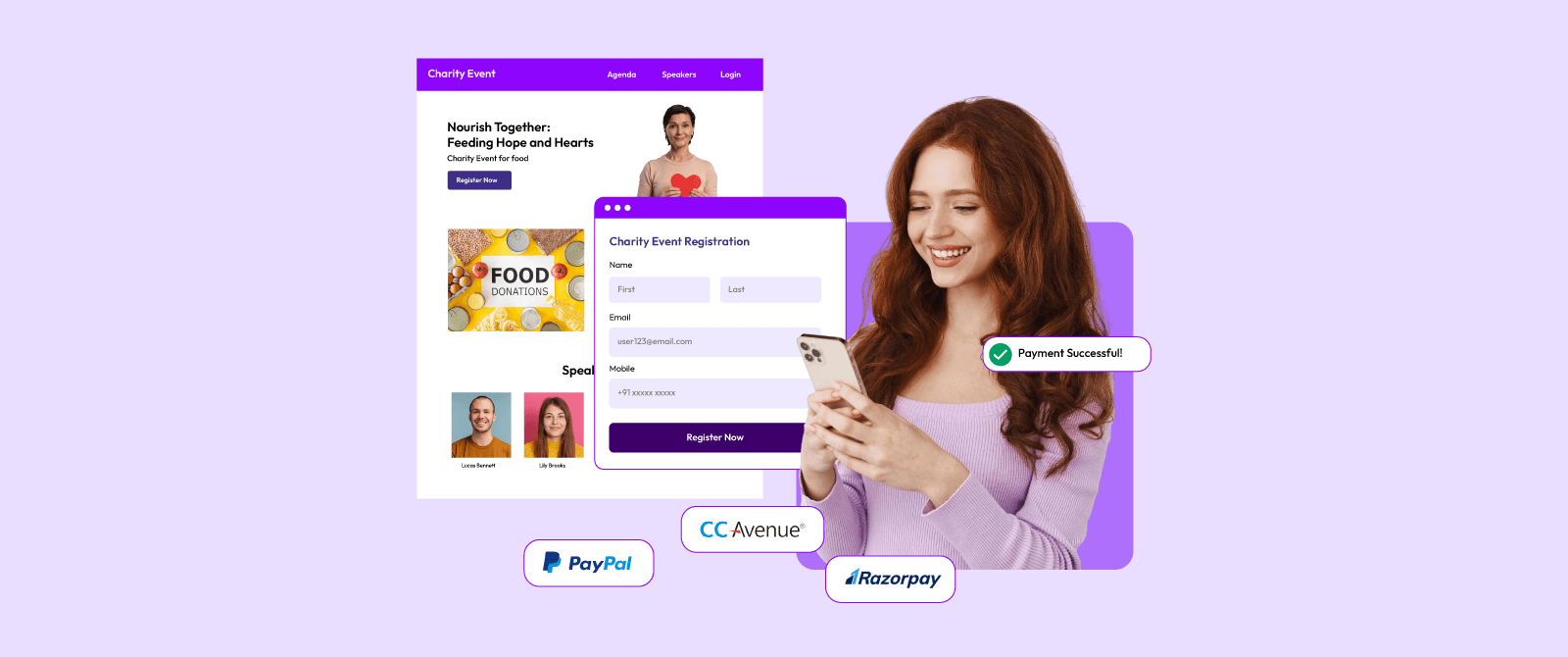
Yes, you can create an event registration page with a payment link and receive payments directly in your bank account. The process typically involves selecting an event registration platform, creating a registration form, connecting your payment gateway account, generating payment-enabled tickets, and publishing the registration page. When attendees register and pay, funds are settled directly to your linked bank account according to your payment gateway’s settlement schedule. This gives you complete control over ticket revenue, faster access to funds, improved transparency, and a smoother registration experience for attendees.
Key Takeaways
- You can create an event registration page and start collecting payments directly into your bank account without building a custom payment system.
- Modern event registration platforms allow organizers to create registration forms, generate payment links, and receive ticket revenue through their own payment gateway accounts.
- Direct bank settlements give organizers full control over funds and reduce dependence on third-party fund-holding models.
- Most payment gateways complete settlements within 1–3 business days, while some offer same-day settlements.
- A registration page should include event details, ticket types, attendee information fields, payment options, confirmation emails, and reporting tools.
- Online event registration can reduce manual registration work by more than 60% while improving attendee data accuracy.
- Payment links support multiple payment methods, including credit cards, debit cards, UPI, net banking, wallets, and international cards.
- Organizers can track registrations and payments in real time through a single dashboard.
- Security features such as PCI-compliant payment processing, SSL encryption, and automated payment confirmations help build attendee trust.
- The best solution combines registration management, payment collection, attendee tracking, and direct bank settlements on a single platform.
Intro
You can create an event registration page by using an event registration platform that supports payment links and direct payment gateway integration. Once connected, attendee payments are automatically settled into your bank account according to your payment gateway’s settlement schedule.
For many event organizers, payment collection is just as important as attendee registration. Creating a registration page is easy. Receiving payments quickly, maintaining full control over ticket revenue, and knowing exactly where the money goes are often the bigger concerns.
Many organizers still face common questions:
- How do I collect payments directly into my bank account?
- Do I need a separate payment gateway?
- Will a ticketing platform hold my money?
- How quickly will I receive funds after ticket sales?
- Can I create a registration page without technical knowledge?
The good news is that modern event registration platforms such as Dreamcast have made the process much simpler. In most cases, you can create a professional registration page, add ticket categories, generate payment links, connect your payment gateway, and start accepting payments within a few hours.
This matters because the event industry continues to move toward digital registration and online payments.Industry studies show that more than 80% of event registrations now happen online, while attendees increasingly expect fast and secure payment options during registration. In fact, 66% of both attendees and organizers rank a fast, frictionless booking process as the most critical feature of a ticketing platform, and 46% of live event attendees now strictly prefer completely cashless transactions for speed and convenience.
The ability to combine attendee registration and direct payment collection into a single workflow can save significant administrative effort while improving the attendee experience.
In this guide, you’ll learn exactly how to create an event registration page with a payment link, how direct bank settlements work, what features to look for in a registration platform, common mistakes to avoid, and the fastest way to start receiving ticket payments directly into your bank account.
Table of Contents
Is It Possible To Create A Registration Page With A Third-Party Payment Gateway Integration?
Yes, it is 100% possible.
The simplest way to create an event registration page and receive payments directly in your bank account is to use an event registration platform that supports payment gateway integration and direct bank settlements. In fact, market performance studies show that unifying registration and payments on an optimized checkout path can recover up to 35.26% of previously lost transactional revenue
Instead of collecting registrations in one system and payments in another, modern event platforms combine everything into a single workflow. Attendees register, select tickets, make payments through a secure payment link, and receive confirmation instantly. At the same time, the payment gateway processes the transaction and settles the funds into your linked bank account.
This smooth transition is vital for attendance rates, as industry checkout benchmarks reveal that every extra step or page redirection during a registration flow drops overall conversion by 5% to 7%.
For organizers, this means complete visibility over registrations and revenue without manually tracking payments.
What Does the Process Look Like?
At a high level, the process involves five simple steps:
| Step | What You Do | Outcome |
| 1 | Create an event registration page | Attendees can register online |
| 2 | Add ticket categories and pricing | Paid registrations become available |
| 3 | Connect your payment gateway account | Payments can be processed securely |
| 4 | Share the registration page or payment link | Attendees can start registering |
| 5 | Receive settlements in your bank account | Revenue reaches your account according to settlement timelines |
Why Do Organizers Prefer Direct Bank Settlements?
One of the biggest concerns for event organizers is cash flow.
For example, selling 500 tickets priced at 2,000 Rs each. That represents 10,000,00 Rs in ticket revenue. If those funds are held by an intermediary platform until after the event, organizers may face difficulties paying vendors, marketing partners, venue providers, and staffing teams. This is because the standard logistics of event planning dictate that critical upfront commitments- such as securing venue spaces and paying vendor signing deposits- typically require 30% to 50% of the entire event budget to be paid months before the event date arrives.
On the other hand, direct settlements solve this issue.
When attendees complete payments, the funds move through your own payment gateway account and are deposited into your registered bank account according to the settlement cycle. This gives organizers:
- Faster access to event revenue
- Better financial planning
- Greater transparency
- Reduced dependency on third-party fund holding
- Improved trust and accountability
Read More: Why Do Enterprise Events Need More Than Basic Registration Tools?
What Components Make Up an Event Registration and Payment System?
A complete event registration setup usually consists of the following elements:
| Component | Purpose |
| Event Registration Page | Displays event information and registration form |
| Ticketing Module | Manages ticket categories and pricing |
| Payment Link | Allows attendees to pay online |
| Payment Gateway | Processes transactions securely |
| Bank Account Integration | Receives settlements |
| Confirmation System | Sends registration and payment confirmations |
| Reporting Dashboard | Tracks registrations, payments, and revenue |
When these components work together, organizers can manage registrations and payments from a single dashboard rather than juggling multiple tools.
How Fast Can You Start Accepting Payments?
For most organizers, the setup process takes only a few hours.
Once your event details, registration form, ticket categories, and payment gateway credentials are configured, you can publish your registration page and begin accepting registrations immediately. Many event organizers launch registration pages weeks or months before an event. This early launch period helps generate advance revenue, estimate attendance, and make data-driven planning decisions.
For example:
- A workshop organizer can begin collecting registrations as soon as speakers are confirmed.
- A conference team can sell early-bird tickets months before the event.
- A festival organizer can use ticket sales data to estimate staffing and inventory requirements.
- A corporate event team can monitor registrations in real time and adjust marketing efforts based on registration trends.
Why Is This Approach Becoming the Standard?
Digital registrations continue to replace manual processes because they improve efficiency and attendee experience. This evolution is evident as the global event management software market surpasses $11.52 billion, driven directly by organizations investing in automation-enabled tools. (softjourn Insights)
Online registration systems can reduce administrative workloads by more than 50%, while automated payment collection significantly reduces manual payment reconciliation and reporting.
Attendees also expect a smooth experience. They want to register in minutes, pay using their preferred payment method, and receive immediate confirmation. This frictionless experience dictates overall conversion success; recent consumer data indicates that 66% of attendees rank a fast, seamless booking process as the single most critical feature of a ticketing platform, while 46% explicitly demand completely cashless transactions for modern speed and convenience.
For organizers, combining an event registration page with direct bank settlements creates a faster, more transparent, and easier way to manage event revenue from the first ticket sale to the final attendee check-in.
What Do You Need Before Creating an Event Registration Page?
Before creating an event registration page with a payment link, you need four essential things: event details, a bank account, a payment gateway account, and an event registration platform.
Many organizers assume they need technical skills, a website developer, or custom payment integration. In reality, most advanced event registration platforms allow you to launch a registration page without writing a single line of code.
Spending a little time preparing these requirements beforehand can save hours during setup and help avoid payment delays later.
1. Event Information
Start by collecting the basic details attendees need before they decide to register.
Your registration page should clearly answer the following questions:
- What is the event?
- When will it take place?
- Where is it happening?
- Who should attend?
- What is included with registration?
- How much does it cost?
At a minimum, prepare:
| Event Details Checklist | Required |
| Event Name | ✓ |
| Event Date and Time | ✓ |
| Event Venue or Virtual Link | ✓ |
| Event Description | ✓ |
| Organizer Information | ✓ |
| Ticket Pricing | ✓ |
| Contact Details | ✓ |
| Terms and Cancellation Policy | Recommended |
Clear event information can significantly improve registration rates because attendees are less likely to leave the registration page with unanswered questions.
2. A Bank Account for Settlements
To receive payments directly, you need a bank account where settlement funds will be deposited.
Most payment gateways require:
- Account holder name
- Bank account number
- IFSC/SWIFT details
- PAN or tax information (depending on the country)
- Business registration details (if applicable)
This account becomes the destination for your ticket revenue.
Many organizers choose a dedicated business account because it simplifies accounting, tax reporting, and event revenue tracking.
3. A Payment Gateway Account
The payment gateway acts as the bridge between your attendees and your bank account.
When a participant purchases a ticket:
- The payment gateway processes the transaction.
- The payment is verified.
- The transaction is recorded.
- Funds are settled to your linked bank account.
A good payment gateway should support:
- Credit cards
- Debit cards
- UPI
- Net banking
- Mobile wallets
- International payments (if required)
Some common examples of payment gateways are:
- PayU
- Razorpay
- PayPal
- CCAvenue
- Stripe
“Offering multiple payment methods can increase checkout completion rates because attendees can choose their preferred option.”
4. An Event Registration Platform
Your event registration platform is where you create the registration page, collect attendee information, and manage ticket sales.
The platform should allow you to:
- Create registration forms
- Configure ticket types
- Add payment links
- Track registrations
- Monitor revenue
- Send confirmation emails
- Export attendee data
The best event registration and ticketing platforms, such as Dreamcast, combine registration management and payment collection in one place, reducing the need for multiple systems.
5. Ticket Structure and Pricing Plan
Before launching registration, decide how your tickets will be sold. Many successful events use multiple pricing levels rather than a single ticket type.
Common examples include:
| Ticket Type | Purpose |
| Early Bird | Reward early registrations |
| Standard Ticket | Main registration category |
| VIP Ticket | Premium attendee experience |
| Student Ticket | Discounted access |
| Group Pass | Encourage team registrations |
This pricing strategy often helps increase overall ticket sales while creating urgency among prospective attendees.
6. Registration Form Fields
One of the most common mistakes organizers make is asking for too much information. Every additional field can increase registration abandonment.
A good registration form typically collects:
- Full Name
- Email Address
- Mobile Number
- Company Name (if relevant)
- Job Title (for business events)
Only collect information that will actually be used during the event.
For example, a networking conference may require professional details, while a music event may only need basic attendee information.
Pre-Launch Checklist
Before publishing your event registration page, verify the following:
- Event details are complete and accurate
- Ticket pricing is configured correctly
- Registration form fields are finalized
- The payment gateway is connected
- Bank account settlement details are verified
- Confirmation emails are enabled
- Test registration has been completed
- The payment link is working properly
Completing this checklist before launch helps ensure attendees experience a smooth registration process and that payments flow directly into your bank account without interruptions.
Once these foundations are in place, the actual setup process becomes straightforward and can often be completed within a few hours.
Step-by-Step Process to Create an Event Registration Page With a Payment Link
Creating an event registration page with a payment link is a straightforward process. Most organizers can set up a fully functional registration and payment system in less than 60 minutes if all required information is ready. Follow the steps below to launch your event and start collecting payments directly into your bank account.
Quick Setup Summary
| Step | Action | Purpose |
| 1 | Choose an Event Registration Platform | Select a platform that supports registration forms, ticketing, payment links, and direct bank settlements. |
| 2 | Create Your Event Page | Add event details such as title, date, venue, agenda, and organizer information. |
| 3 | Build the Registration Form | Collect attendee information such as name, email address, and phone number. |
| 4 | Configure Ticket Categories | Create ticket types such as Early Bird, Standard, VIP, or Group Passes. |
| 5 | Connect Your Payment Gateway | Link your payment gateway account to process online payments securely. |
| 6 | Generate Payment-Enabled Registrations | Enable payment collection so attendees can pay while registering. |
| 7 | Configure Automatic Confirmation Messages | Send instant registration confirmations, payment receipts, and event details automatically. |
| 8 | Test the Workflow | Verify registration forms, payment links, emails, and settlement settings before launch. |
| 9 | Publish and Promote the Page | Share the registration page through email, social media, websites, partners, and advertisements. |
| 10 | Monitor Registrations and Settlements | Track attendee registrations, ticket sales, revenue, and payment settlements in real time. |
Step 1: Select an Event Registration Platform
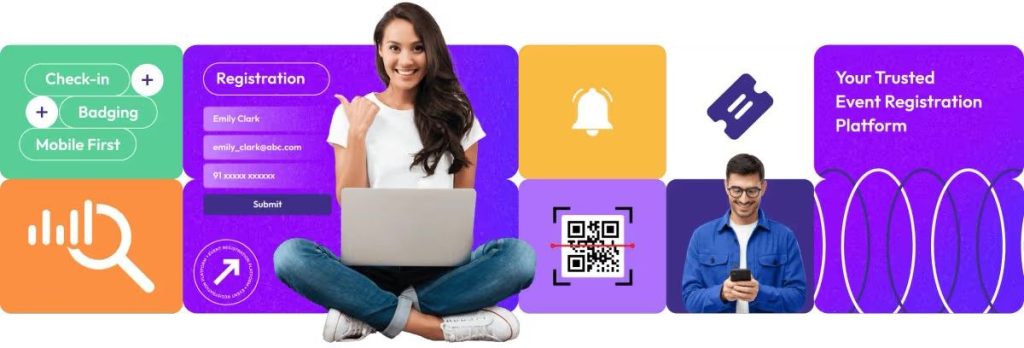
The first step is choosing an event registration platform that supports:
- Online registration forms
- Ticket management
- Payment gateway integration
- Direct bank settlements
- Automated confirmations
- Registration reporting
This decision matters because your registration platform becomes the central system for attendee management and revenue tracking. When evaluating platforms, prioritize functionality over the number of features. A simple platform with strong registration and payment capabilities often performs better than a complicated system with features you may never use.
Read More: 11 Event Registration and Management Platforms Compared: Top 5 Picks for Large-Scale Events
Step 2: Create Your Event Registration Page
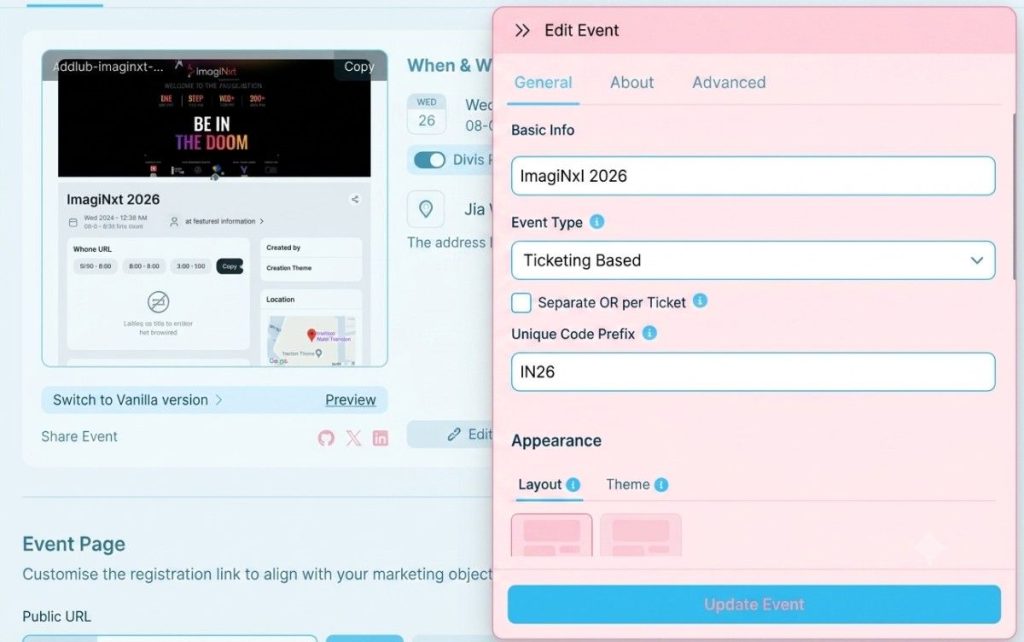
Once the platform is selected, create your event page. Your registration page should include:
- Event title
- Event description
- Event date and time
- Venue information
- Agenda or schedule
- Speaker information (if applicable)
- Event images
- Registration deadline
- Contact information
Think of the registration page as your event’s sales page.
Industry studies consistently show that attendees are more likely to register when they can clearly understand the value of the event within the first few seconds of visiting the page.
Step 3: Build the Registration Form
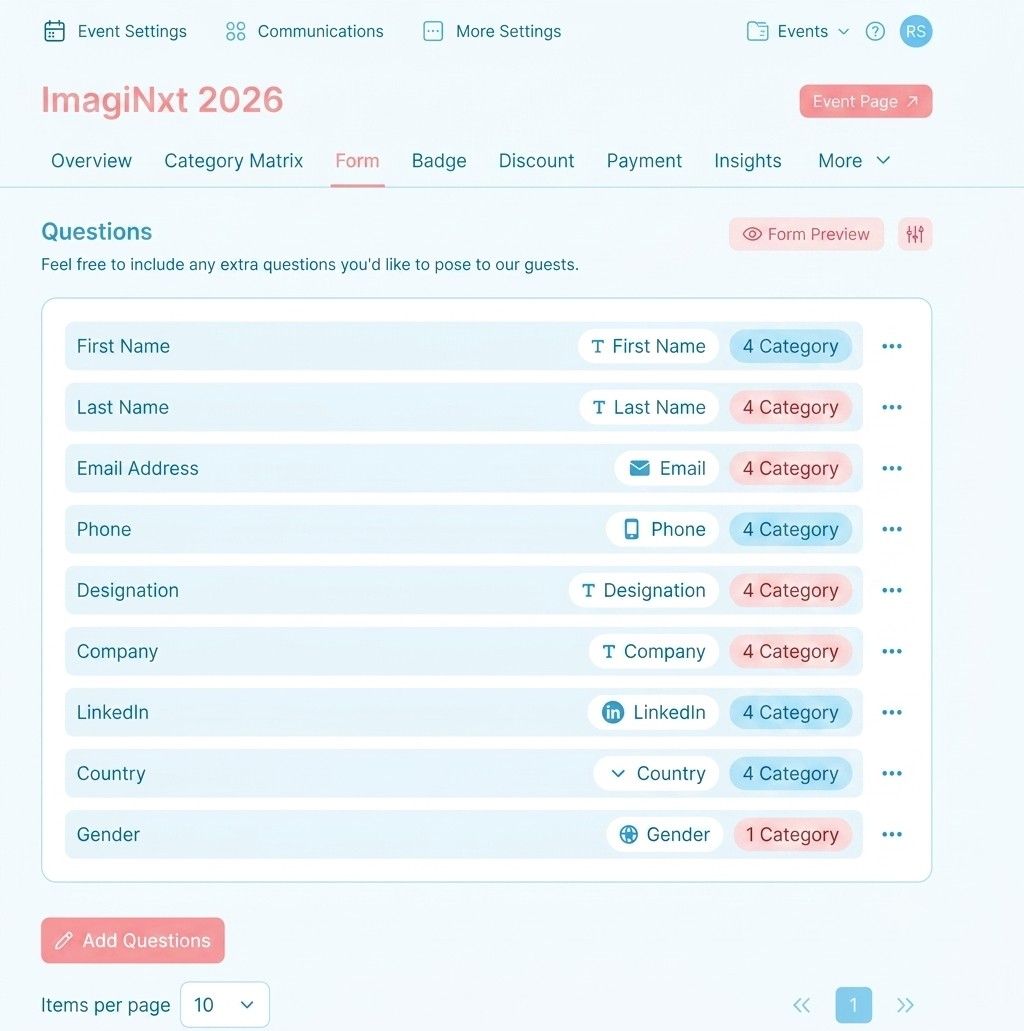
Next, create the attendee registration form.
Keep it concise.
The most effective registration forms ask only for information that is genuinely needed.
Typical fields include:
| Registration Field | Required for Most Events |
| Full Name | Yes |
| Email Address | Yes |
| Mobile Number | Yes |
| Company Name | Optional |
| Job Title | Optional |
| Session Selection | Event Dependent |
Many organizers notice higher completion rates after reducing unnecessary fields.
Step 4: Create Ticket Categories
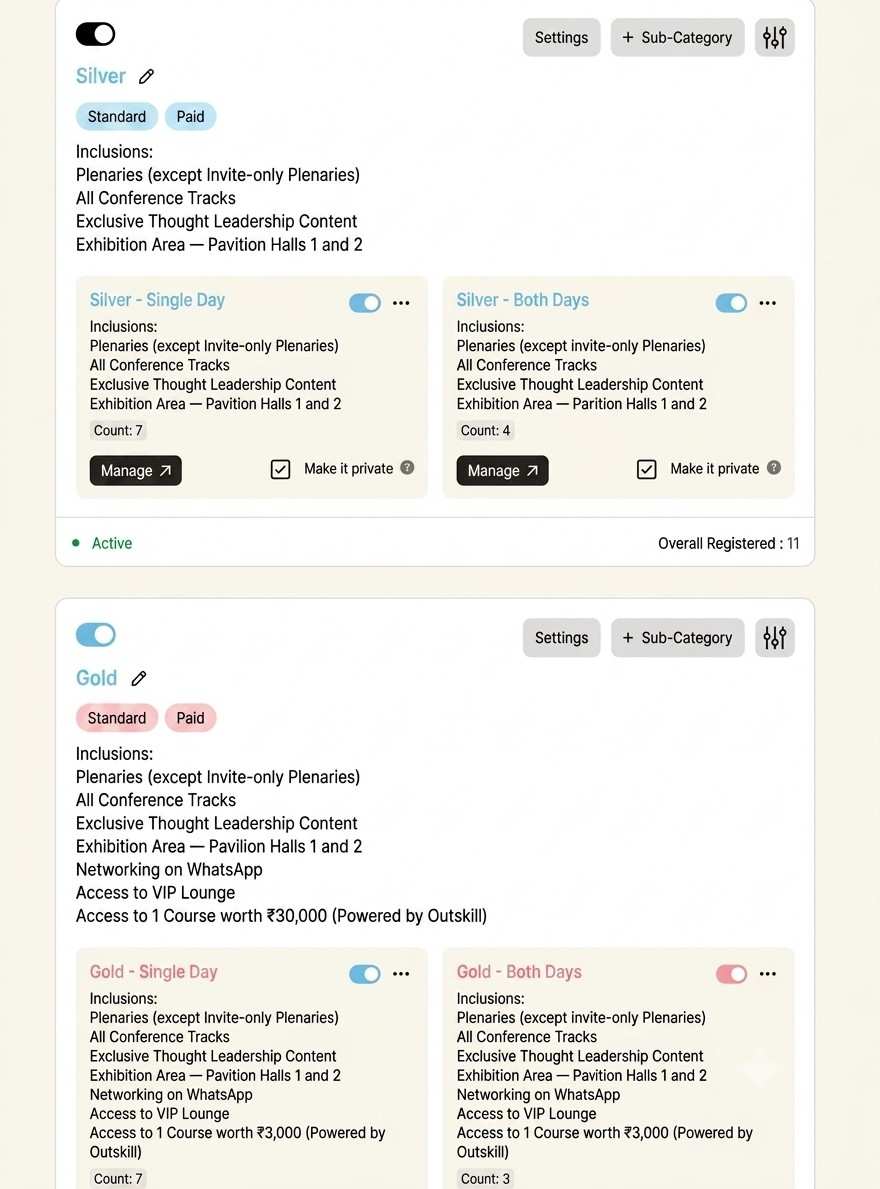
Now configure your ticket options.
Different ticket categories help serve different attendee groups while maximizing revenue opportunities.
A common setup looks like this:
| Ticket Type | Example Price |
| Early Bird | 999 Rs |
| Standard Pass | 1,499 Rs |
| VIP Pass | 2,999 Rs |
| Student Pass | 499 Rs |
| Group Pass | 5,999 Rs |
Having multiple ticket options can increase conversions because attendees can choose a price point that matches their needs and budget.
Step 5: Connect Your Payment Gateway (Important Step)
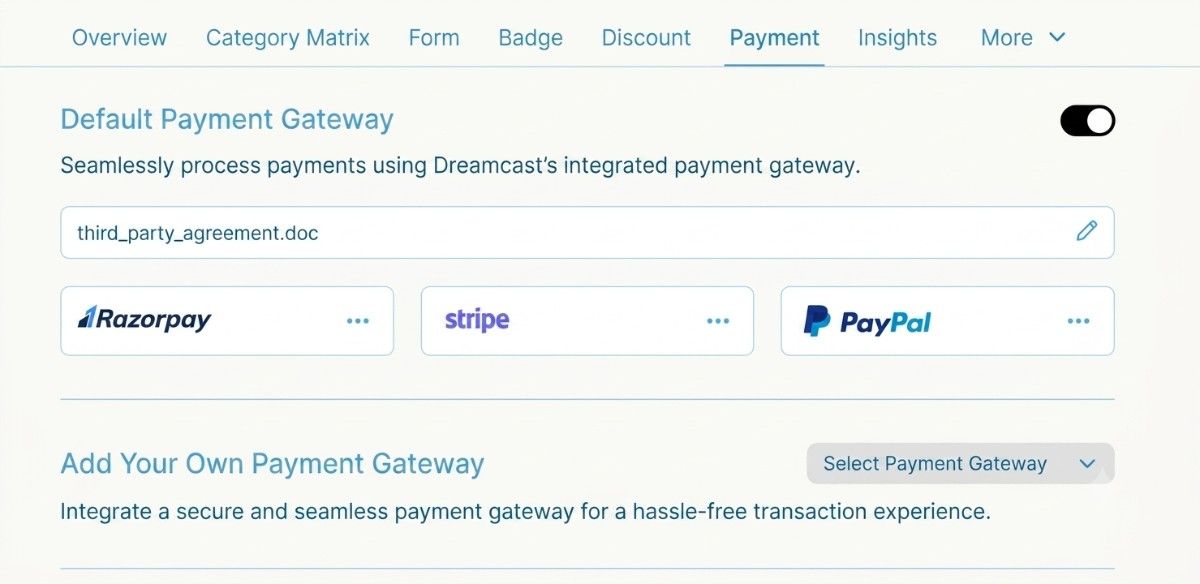
This is the most important step for direct bank settlements. Connect your preferred payment gateway account to the registration platform.
Once connected:
- Attendee submits registration.
- The payment gateway processes the payment.
- The transaction is verified.
- Registration is confirmed.
- Settlement is initiated to your bank account.
This setup ensures organizers maintain control over ticket revenue rather than relying on manual payment collection methods.
Step 6: Generate a Payment Link
After the payment gateway is connected, payment links can be generated automatically.
These payment links are embedded within the registration workflow.
Attendees simply:
- Complete the registration form
- Select a ticket
- Click the payment button
- Finish payment
- Receive confirmation
Modern payment link support:
- UPI
- Credit cards
- Debit cards
- Net banking
- Digital wallets
- International cards
Step 7: Configure Automated Confirmation Messages
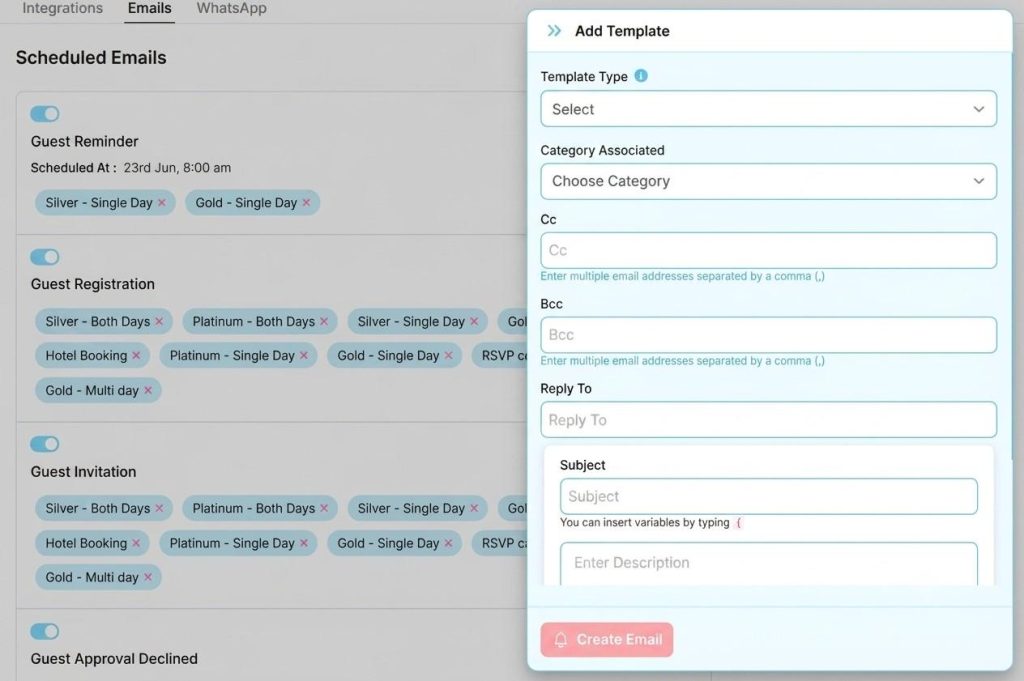
Your confirmation workflow should include:
- Registration confirmation email
- Payment receipt
- Ticket details
- QR code or digital pass (if applicable)
- Event instructions
- Support contact information
Automated confirmations reduce attendee inquiries and improve confidence in the registration process.
Step 8: Test the Complete Registration Flow
Before making the page public, perform several test registrations. This is a step many organizers skip, and it often leads to issues. A few minutes of testing can prevent registration problems that may affect hundreds or thousands of attendees later.
In order to avoid errors, verify that:
- Registration forms are submitted correctly
- Ticket pricing is accurate
- Payment links function properly
- Confirmation emails are delivered
- Attendee records appear in reports
- Payments reach the correct account
Step 9: Publish and Promote Your Registration Page
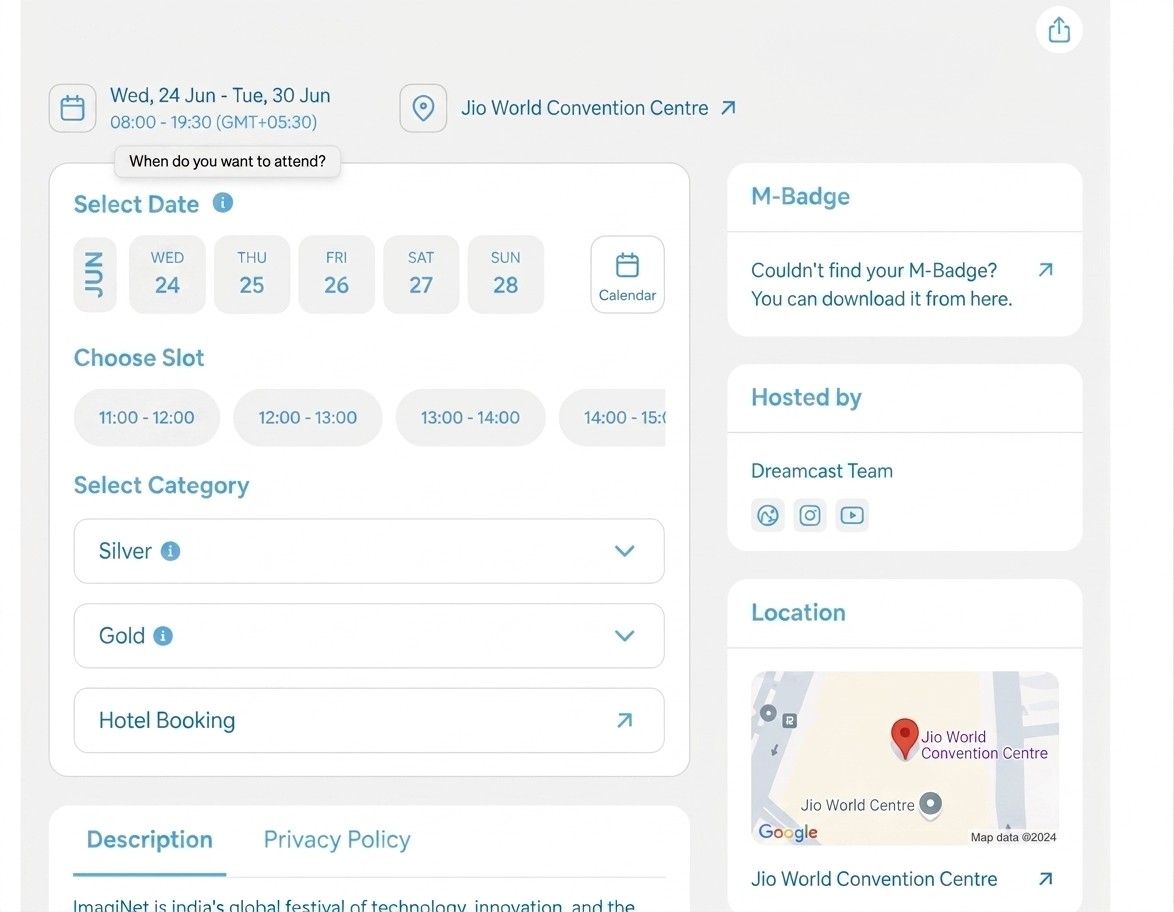
Once testing is complete, publish the registration page.
You can then share it through:
- Email campaigns
- Social media
- Event websites
- Partner websites
- Speaker networks
- QR codes
- Digital advertisements
Many organizers begin promotion 60–90 days before the event to maximize registration volume and benefit from early-bird sales.
Step 10: Monitor Registrations and Revenue in Real Time
After launch, continuously track performance.
Key metrics include:
| Metric | Why It Matters |
| Total Registrations | Measures event demand |
| Tickets Sold | Tracks sales performance |
| Revenue Collected | Monitors cash flow |
| Conversion Rate | Shows registration efficiency |
| Payment Success Rate | Identifies checkout issues |
| Traffic Sources | Reveals best marketing channels |
For example, if 1,000 people visit your registration page and 120 complete registration, your conversion rate is 12%. Tracking these numbers allows organizers to make informed decisions throughout the registration period.
Once these 10 steps are completed, attendees can register and pay online in a single process, while payments are automatically settled to your linked bank account according to your payment gateway’s settlement schedule.
What Features Should You Look for in an Event Registration Platform?
Not all event registration platforms are built the same. Some only collect registrations. Others handle ticketing but hold your funds. The best platforms allow you to create registration pages, collect payments, manage attendees, and receive settlements directly into your bank account from a single system.
Choosing the right platform can have a direct impact on registration rates, attendee experience, operational efficiency, and revenue management.
Before making a decision, evaluate the platform against the features below.
| Feature | What It Helps You Do |
| Direct Payment Gateway Integration | Process payments through your own payment gateway account and maintain control over revenue. |
| Customizable Event Registration Pages | Create branded registration pages with event details, speaker information, and agendas. |
| Flexible Registration Forms | Collect the attendee information that is relevant to your event. |
| Multiple Ticket Types and Pricing Options | Offer Early Bird, Standard, VIP, Student, Group, and promotional tickets. |
| Secure Payment Collection | Protect attendee information and process payments securely. |
| Automated Confirmation and Communication | Send registration confirmations, payment receipts, tickets, and event reminders automatically. |
| Real-Time Reporting and Analytics | Track registrations, ticket sales, revenue, and payment status from a single dashboard. |
| QR Code Tickets and Check-In Capabilities | Speed up attendee entry and improve on-site event management. |
| Multi-Payment Method Support | Accept UPI, credit cards, debit cards, net banking, wallets, and international payments. |
| Attendee Management Tools | Manage attendee records, registration status, communications, and event data efficiently. |
1. Direct Payment Gateway Integration
If receiving payments directly into your bank account is a priority, this should be one of the first features you evaluate. The platform should support integration with your preferred payment gateway so that payments are processed through your own merchant account rather than being routed through an intermediary.
Look for:
- Direct payment gateway integration
- Support for multiple gateways
- Secure payment processing
- Transparent settlement tracking
- Control over ticket revenue
This gives organizers greater visibility into cash flow and eliminates uncertainty around fund disbursement timelines.
2. Customizable Event Registration Pages
Your registration page is often the first interaction attendees have with your event. A good platform should allow you to create professional registration pages without requiring technical expertise.
Key capabilities include:
| Feature | Why It Matters |
| Custom Branding | Maintains event identity |
| Event Banners and Images | Improves engagement |
| Agenda Display | Helps attendees understand the event |
| Speaker Profiles | Builds credibility |
| Mobile-Friendly Design | Supports mobile registrations |
| Custom URLs | Easier promotion and sharing |
Industry data shows that mobile devices account for a significant portion of event registrations, making responsive design essential.
3. Flexible Registration Forms
Every event collects different attendee information. A networking conference may need company details and job titles. A music event may only require basic contact information. Look for platforms that support:
- Custom registration fields
- Conditional questions
- Required and optional fields
- Multiple attendee categories
- Group registrations
The ability to customize forms helps organizers gather useful attendee data without making registration complicated.
4. Multiple Ticket Types and Pricing Options
Ticket flexibility is important for maximizing registrations and revenue. A platform should allow you to create:
- Early-bird tickets
- Standard tickets
- VIP passes
- Student tickets
- Group tickets
- Complimentary passes
It should also support:
- Promo codes
- Discount campaigns
- Quantity limits
- Time-based pricing changes
This flexibility helps organizers run targeted registration campaigns throughout the event lifecycle.
5. Secure Payment Collection
Security is one of the biggest factors affecting attendee trust. A registration platform should support secure payment processing and industry-standard security practices.
Look for:
- SSL-secured registration pages
- PCI-compliant payment processing
- Fraud prevention measures
- Secure attendee data storage
- Payment verification mechanisms
When attendees feel confident about payment security, they are more likely to complete registration.
6. Automated Confirmation and Communication
Manual confirmations can consume significant administrative time, especially for large events. The platform should automatically send:
- Registration confirmations
- Payment receipts
- Ticket details
- Event reminders
- Event updates
Research across the events industry consistently shows that automated communication reduces support requests and improves attendee satisfaction.
7. Real-Time Reporting and Analytics
Data helps organizers make better decisions before, during, and after an event.
A strong reporting dashboard should provide visibility into:
| Metric | Benefit |
| Registrations | Tracks attendee growth |
| Ticket Sales | Monitors demand |
| Revenue Collected | Tracks event income |
| Payment Status | Identifies failed transactions |
| Registration Sources | Measures marketing effectiveness |
| Attendance Trends | Supports planning decisions |
Real-time access to this information allows organizers to adjust marketing efforts and forecast attendance more accurately.
8. QR Code Tickets and Check-In Capabilities
Registration is only part of the attendee experience.
The platform should also help manage event entry.
Useful features include:
- QR code ticket generation
- Digital event passes
- Self-check-in options
- Real-time attendance tracking
Large events often process hundreds or thousands of attendees within a short period. Automated check-in tools can significantly reduce entry delays and staffing requirements.
Read More: How to Solve Check-Ins in Large-Scale Events and Make Them Queue-Free?
9. Multi-Payment Method Support
Attendees expect flexibility when making payments.
A registration platform should support a broad range of payment methods, including:
- UPI
- Credit cards
- Debit cards
- Net banking
- Digital wallets
- International cards
Offering multiple payment options helps reduce checkout abandonment and improve payment success rates.
10. Attendee Management Tools
Managing attendees becomes increasingly complex as registration numbers grow.
A complete attendee management system should include:
- Attendee database
- Registration status tracking
- Ticket transfer management
- Bulk communication tools
- Exportable attendee reports
These capabilities become particularly valuable for conferences, trade shows, festivals, and corporate events with large attendee volumes.
Which Features Matter Most?
If your primary goal is to create an event registration page and receive payments directly into your bank account, prioritize these five features first:
- Direct payment gateway integration
- Direct bank settlements
- Secure payment collection
- Automated confirmations
- Real-time registration and revenue reporting
Note: These features directly impact payment processing, attendee experience, operational efficiency, and financial control. A platform may offer dozens of features, but if it cannot provide a smooth registration process and transparent payment collection, it may not be the right choice for your event.
What Are the Benefits of Receiving Event Payments Directly in Your Bank Account?
Receiving event payments directly in your bank account gives you greater financial control, faster access to revenue, and better transparency throughout the event lifecycle. For many event organizers, registration is only one part of the process. Managing cash flow, paying vendors, funding marketing campaigns, and handling event operations often depend on having timely access to ticket revenue.
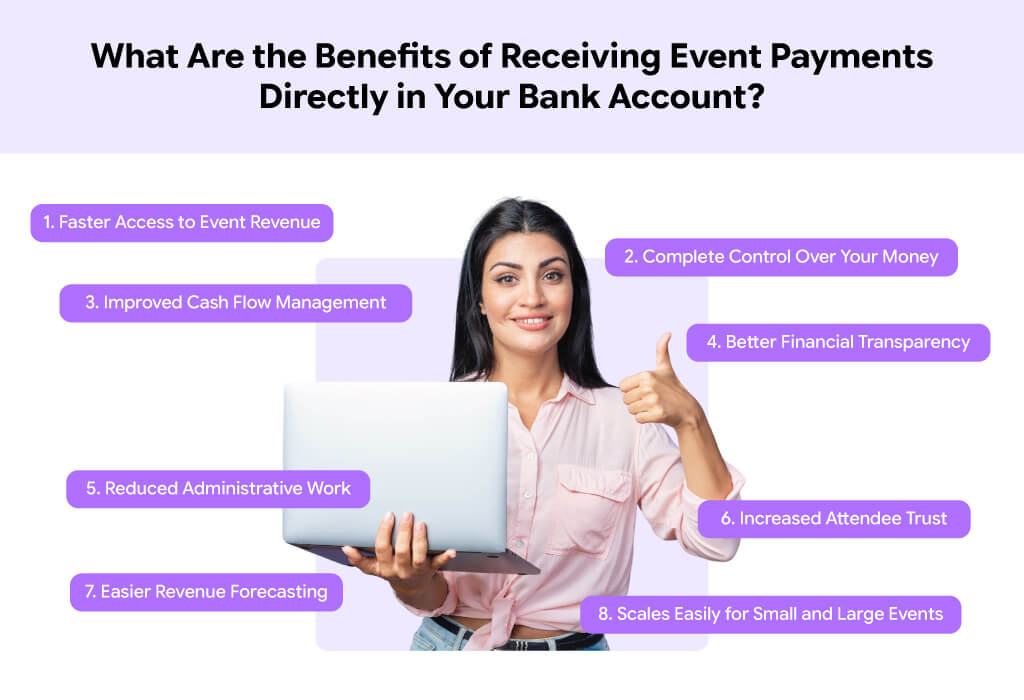
Benefits at a Glance
When payments are settled directly into your bank account, you maintain ownership of your funds from the moment attendees purchase tickets.
1. Faster Access to Event Revenue
One of the biggest advantages of direct settlements is speed. Events often require significant upfront spending on:
- Venue bookings
- Marketing campaigns
- Speaker fees
- Production services
- Staffing
- Equipment rentals
If ticket revenue is available sooner, organizers can cover these expenses more efficiently.
For example, an organizer selling 1,000 tickets at 1,500 Rs each generates 15,000,00 Rs in revenue. Having access to these funds during the registration period can help support event operations without relying heavily on external financing.
2. Complete Control Over Your Money
Many organizers want visibility into where their money is, how much has been collected, and when it will be received. Direct bank settlements provide:
- Revenue ownership
- Transparent payment tracking
- Better financial planning
- Reduced dependency on third parties
This level of control becomes increasingly important as event budgets grow.
3. Improved Cash Flow Management
Cash flow is one of the most important indicators of event health. A steady flow of incoming ticket revenue allows organizers to:
- Pay vendors on time
- Launch additional marketing campaigns
- Expand event services
- Handle unexpected expenses
Without predictable cash flow, even successful events can face operational challenges.
4. Better Financial Transparency
Financial transparency builds confidence among organizers, finance teams, sponsors, and stakeholders. With direct settlements, organizers can easily track:
| Financial Metric | Why It Matters |
| Tickets Sold | Measures event demand |
| Revenue Collected | Tracks income growth |
| Settlement Status | Monitors incoming funds |
| Refund Activity | Tracks payment adjustments |
| Net Revenue | Supports budgeting decisions |
This visibility reduces confusion and improves reporting accuracy.
5. Reduced Administrative Work
Manual payment reconciliation can consume hours every week. When registrations and payments are connected through a single platform:
- Payments are automatically recorded
- Attendee records update automatically
- Revenue reports are generated instantly
- Finance teams spend less time on manual tracking
For larger events with hundreds or thousands of registrations, this time savings can be substantial.
6. Increased Attendee Trust
Attendees are more likely to complete registration when payment processing appears secure and professional.
A registration process that includes:
- Secure payment pages
- Instant payment confirmations
- Automated receipts
- Transparent transaction records
helps build confidence and reduce registration abandonment.
7. Easier Revenue Forecasting
Forecasting becomes much easier when organizers can see ticket sales and revenue in real time.
Instead of estimating future income, event teams can make decisions based on actual registration data.
This helps with:
- Budget planning
- Staffing decisions
- Venue requirements
- Inventory forecasting
- Sponsorship discussions
The earlier organizers understand revenue trends, the better they can plan the event.
8. Scales Easily for Small and Large Events
Direct payment collection works equally well for:
- Workshops with 50 attendees
- Conferences with 5,000 attendees
- Trade shows
- Networking events
- Festivals
- Corporate events
As registration volume grows, automated payment collection becomes even more valuable because it reduces manual work while maintaining accuracy.
Why Does This Matter?
The ability to collect registrations and receive payments directly into your bank account is no longer just a convenience. It has become an important part of running efficient, financially healthy events. When organizers have direct access to revenue, they can make faster decisions, maintain better financial oversight, and focus more on delivering a successful attendee experience rather than managing payment-related challenges.
What Common Mistakes Should You Avoid When Setting Up Event Registration and Payment Collection?
Even the best event registration platform cannot prevent mistakes caused by poor setup decisions. Small errors during registration or payment configuration can lead to lost registrations, failed payments, attendee frustration, and revenue leakage.
Common Mistakes and Their Impact
| Mistake | Potential Impact |
| Long Registration Forms | Higher abandonment rates |
| No Testing Before Launch | Registration and payment failures |
| Platform Holds Funds | Reduced cash flow control |
| Poor Mobile Experience | Lost registrations |
| Limited Payment Methods | Lower payment completion rates |
| No Automated Confirmations | Increased support requests |
| Lack of Analytics Monitoring | Missed optimization opportunities |
| Weak Pricing Strategy | Lower revenue potential |
| Security Gaps | Reduced attendee trust |
| Delayed Registration Launch | Fewer ticket sales |
The good news is that most of these issues are easy to avoid with proper planning.
1. Asking for Too Much Information
One of the most common registration mistakes is creating long and complicated forms.
Every additional field creates extra work for attendees.
For example, if your event only requires a name, email address, and phone number, asking for company size, address, social media profiles, and other non-essential details can increase form abandonment.
A simple rule is:
Collect only the information you actually need.
2. Not Testing the Registration Flow Before Launch
Many organizers publish registration pages without completing a full test registration. As a result, they discover problems only after attendees start registering.
Always test:
- Registration forms
- Ticket selection
- Payment links
- Confirmation emails
- QR code generation
- Settlement configuration
A single test registration can identify issues before they affect paying attendees.
3. Choosing a Platform That Holds Your Funds
Some event platforms process payments but keep funds until a specific payout date. This may create cash flow challenges for organizers who need revenue during the registration period.
Before selecting a platform, verify:
- Who controls the payment gateway account
- Where funds are deposited
- Settlement timelines
- Withdrawal conditions
Understanding this early helps avoid surprises later.
4. Ignoring Mobile Registration Experience
Mobile traffic continues to account for a large share of online registrations. If your registration page is difficult to use on smartphones, potential attendees may leave before completing payment.
Review your registration page on:
- Android devices
- iPhones
- Tablets
- Different screen sizes
The registration process should be fast and easy regardless of device.
5. Offering Limited Payment Options
Attendees have different payment preferences. Some prefer UPI. Others use credit cards, debit cards, net banking, or digital wallets.
Limiting payment options can reduce completed registrations. A broader range of payment methods typically improves payment success rates and attendee convenience.
6. Not Using Automated Confirmation Messages
After making a payment, attendees expect immediate confirmation. Without automated communication, support teams often receive unnecessary inquiries such as:
- Did my registration go through?
- Was my payment successful?
- Where is my ticket?
- When will I receive event details?
Automated confirmations help eliminate this uncertainty.
7. Failing to Monitor Registration Data
Publishing a registration page is only the beginning.
Successful organizers regularly track:
| Metric | Why It Matters |
| Registration Volume | Measures event demand |
| Ticket Sales | Tracks revenue growth |
| Conversion Rate | Shows registration effectiveness |
| Payment Success Rate | Identifies checkout issues |
| Revenue Collected | Supports financial planning |
Waiting until the event date to review data can limit opportunities for improvement.
8. Setting Ticket Prices Without a Strategy
Pricing directly influences registration performance.
Many organizers make one of two mistakes:
- Pricing tickets too high and limiting demand
- Pricing tickets too low and reducing revenue potential
A better approach is to offer multiple ticket categories such as:
- Early Bird
- Standard
- VIP
- Student
- Group Pass
This allows attendees to choose the option that best fits their needs while helping organizers maximize revenue.
9. Ignoring Security and Compliance
Attendees trust organizers with personal and payment information. Using secure payment processing and trusted payment gateways is essential. Before launch, verify that your registration platform supports:
- Secure payment processing
- SSL protection
- Secure attendee data handling
- Fraud prevention measures
Trust plays a major role in registration completion rates.
10. Waiting Too Long to Open Registration
Many organizers delay registration until every event detail is finalized. This can reduce the time available for promotion and ticket sales.
In many cases, registration can open as soon as:
- The date is confirmed
- Venue is confirmed
- Pricing is finalized
- Core event information is available
Earlier registration often means more time to generate awareness and revenue.
Why Choose Dreamcast to Create an Event Registration Page With Third-Party Payment Gateway Integration?
If your goal is to create an event registration page, collect payments online, and receive funds directly in your bank account, Dreamcast provides a practical solution by combining event registration, ticketing, attendee management, and third-party payment gateway integration within a single platform.
With 15+ years of experience in event technology, 5,000+ events delivered globally, and the trust of thousands of brands worldwide, Dreamcast has helped organizers streamline registrations, manage payments, and deliver smooth event experiences across conferences, exhibitions, corporate events, trade shows, and large-scale gatherings. The platform offers end-to-end event management capabilities, from registration and ticketing to attendee engagement, check-in, and analytics, making it suitable for events of all sizes.
Instead of relying on platforms that control the payment process or hold your ticket revenue, Dreamcast allows organizers to integrate their preferred payment gateway and maintain ownership of their event funds.
This means attendees can register and pay online while settlements are processed according to the terms of their own payment gateway account.
Direct Payment Collection Through Your Preferred Payment Gateway
One of the biggest advantages of Dreamcast is its support for third-party payment gateway integration. It means organizers can connect their existing payment gateway account and collect payments directly from attendees.
Benefits include:
- Direct payment collection
- Greater visibility into revenue
- Transparent settlement process
- Improved financial control
- Reduced dependency on intermediary fund management
This approach is particularly useful for conferences, exhibitions, trade shows, corporate events, festivals, and paid workshops where cash flow management is important.
Create Professional Event Registration Pages Without Technical Skills
Dreamcast allows organizers to create event registration pages without requiring coding knowledge. You can quickly configure:
- Event details
- Registration forms
- Ticket categories
- Event branding
- Speaker information
- Event agenda
- Registration deadlines
This helps organizers launch registration faster and begin collecting attendee data immediately.
Flexible Registration and Ticketing Management
Every event has different registration requirements.
Dreamcast supports:
- Paid registrations
- Free registrations
- Early-bird tickets
- VIP tickets
- Group registrations
- Discount and promo code campaigns
- Multiple attendee categories
This flexibility helps organizers manage a wide range of event formats from small workshops to large-scale conferences.
Multiple Payment Methods for Better Registration Completion
Attendees expect flexibility during checkout. With payment gateway integration, organizers can support:
- UPI payments
- Credit cards
- Debit cards
- Net banking
- Digital wallets
- International payment options (subject to gateway support)
Providing multiple payment options helps reduce checkout abandonment and improves the overall registration experience.
Automated Registration and Payment Workflows
Manual registration management can become difficult as attendee numbers increase. But wait! Dreamcast automates key tasks such as:
- Registration confirmations
- Payment confirmations
- Ticket generation
- QR code creation
- Event reminders
- Attendee communications
Automation reduces administrative effort while helping attendees receive important event information instantly.
Real-Time Registration and Revenue Tracking
Successful event planning depends on accurate data. Dreamcast provides real-time visibility into:
| Metric | What It Helps Track |
| Total Registrations | Event growth |
| Ticket Sales | Registration performance |
| Revenue Collected | Financial progress |
| Payment Status | Successful and failed transactions |
| Attendee Information | Audience insights |
| Registration Sources | Marketing effectiveness |
Having access to this information helps organizers make faster and better-informed decisions throughout the registration period.
Built for Events of Every Size
Whether you are managing:
- A 500-person workshop
- A corporate conference
- A trade show with 5,000+ attendees
- A networking event
- A large-scale exhibition (with 5,000,00+ attendees)
- A multi-day festival
Dreamcast provides the tools needed to manage registrations, payments, attendee data, and event operations from a centralized platform.

Why Event Organizers Choose Dreamcast
| Capability | Benefit |
| Third-Party Payment Gateway Integration | Direct payment collection through your preferred gateway |
| Custom Registration Pages | Faster event setup and branding control |
| Flexible Ticketing | Supports multiple pricing strategies |
| Automated Communications | Reduces manual work |
| QR Code Ticketing | Faster event check-in |
| Real-Time Analytics | Better visibility into registrations and revenue |
| Attendee Management | Centralized event operations |
| Direct Revenue Control | Greater financial transparency |
Conclusion
Creating an event registration page with a payment link is easier than ever. The key is choosing a platform that not only helps you collect registrations but also gives you control over your event revenue through direct payment gateway integration.
With the right setup, you can:
- Create a professional registration page in minutes
- Accept payments through multiple payment methods
- Receive settlements directly in your bank account
- Automate confirmations and attendee communications
- Track registrations and revenue in real time
- Reduce manual work and administrative overhead
The result? A smoother registration experience for attendees and better financial control for organizers.
Whether you’re hosting a 500-person workshop or a 10,000+ attendee conference, combining event registration and direct payment collection in a single platform can help you save time, improve transparency, and focus on delivering a successful event instead of managing payment complexities.
The sooner you set up the right registration and payment workflow, the sooner you can start selling tickets and growing your event.
People Also Ask
Yes. Most modern event registration platforms, such as Dreamcast, provide drag-and-drop tools and ready-made templates that allow you to create a professional registration page without any technical expertise or coding skills.
You can receive payments directly in your bank account by connecting your own payment gateway account to the event registration platform. Once attendees complete payment, the funds are settled according to your payment gateway’s settlement schedule.
In most cases, yes. A payment gateway is required to securely process online transactions. Many event registration platforms support third-party payment gateway integrations, allowing organizers to use their preferred payment provider. In addition, event registration and ticketing platforms such as Dreamcast also offer their own payment gateway options if you don’t have one of your own
For most events, a registration page can be created within a few hours. The exact setup time depends on factors such as ticket configuration, payment gateway integration, registration form customization, and event content preparation.
Yes. Most event registration platforms automatically generate payment-enabled registration flows or payment links that attendees can use to purchase tickets online.
A good registration page should support multiple payment options, including:
UPI
Credit cards
Debit cards
Net banking
Digital wallets
International cards (if required)
Offering multiple payment methods can improve payment completion rates.
Yes. Most platforms allow organizers to create multiple ticket types such as Early Bird, Standard, VIP, Student, Group, and Complimentary Passes. This helps target different attendee segments and pricing strategies.
The most common registration fields include:
Full Name
Email Address
Mobile Number
Company Name
Job Title
Only collect information that is necessary for your event to keep the registration process simple and efficient.
Once an attendee completes registration and payment, the platform automatically sends confirmation emails containing registration details, payment receipts, ticket information, and event instructions.
Yes. Most event registration platforms provide dashboards where organizers can monitor registrations, ticket sales, revenue collected, payment status, and attendee data in real time.
If a payment fails, the registration is usually marked as incomplete. The attendee can attempt the payment again using the same or a different payment method, depending on the platform’s configuration.
Yes. Reputable event registration platforms use secure payment processing, SSL encryption, and PCI-compliant payment gateways to protect attendee and transaction data.
Yes. Dreamcast supports both free and paid registrations. Organizers can even combine free and paid ticket categories within the same event.
Check whether the platform supports third-party payment gateway integration and allows you to connect your own merchant account. This typically enables payments to be settled directly through your payment gateway arrangement.
The most effective approach is to use an event registration platform that offers customizable registration pages, flexible ticketing, third-party payment gateway integration, automated attendee communications, and real-time reporting. This allows you to manage registrations and payments from a single system while maintaining control over your event revenue.