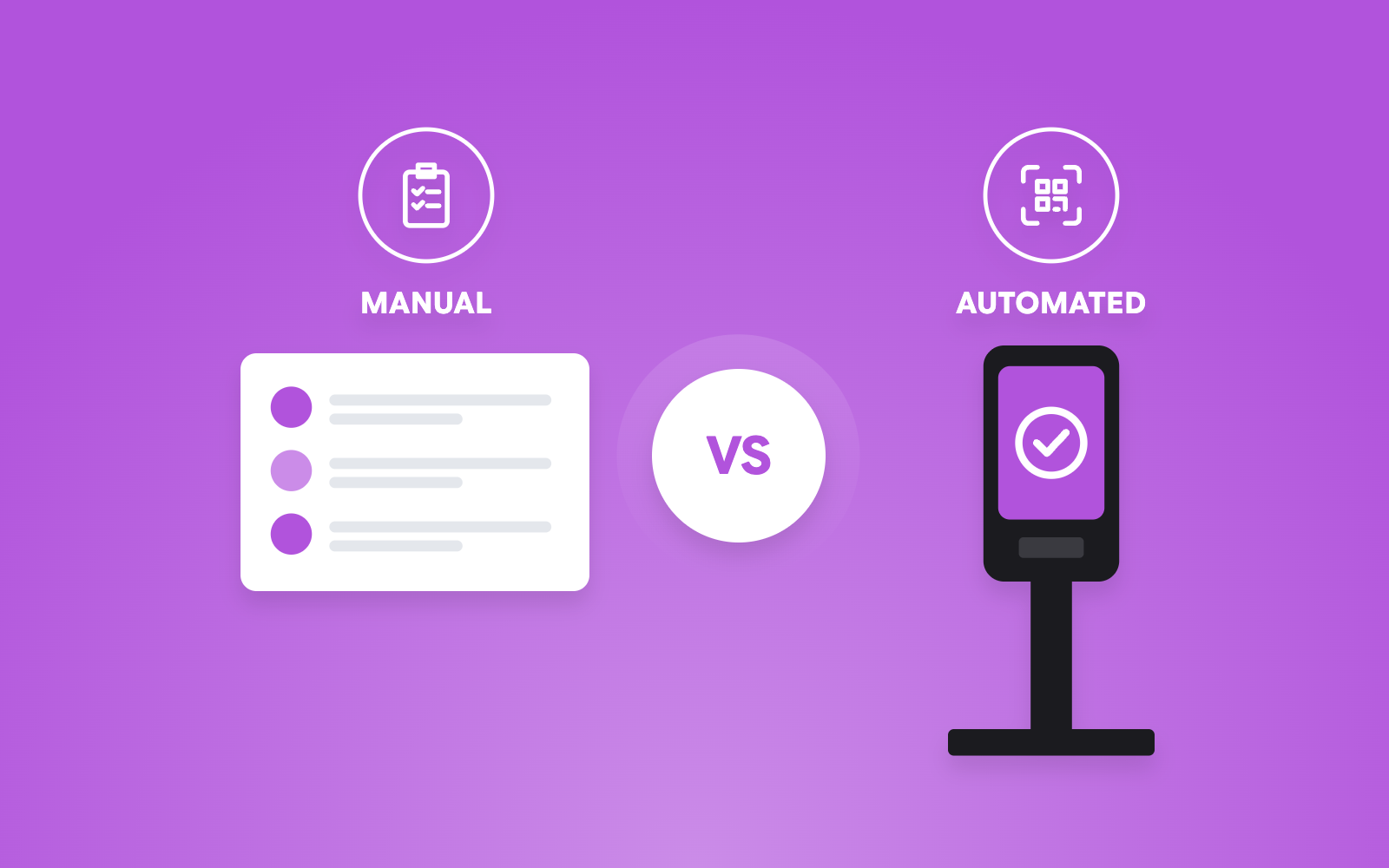



QR code event check-in lets attendees enter a conference or trade show by scanning a unique QR code instead of searching for names or using paper lists. It reduces waiting time, improves entry accuracy, tracks attendance in real time, and gives organizers better control over access, reporting, and event operations
Key Takeaways
- QR code check-in replaces manual registration with fast digital scanning.
- Most attendees can complete check-in in just a few seconds with the right setup. A 2025 study found QR-based check-in reduced average processing time from 45 seconds to just 7 seconds per attendee, making the process 84% faster than manual registration.
- Real-time attendance data helps organizers monitor visitor flow and venue capacity.
- QR codes reduce human errors caused by manual name searches or printed lists.
- QR check-in works well for conferences, trade shows, exhibitions, corporate events, seminars, and networking events.
- The system can also support badge printing, access control, session tracking, and lead retrieval.
- A successful setup depends on testing scanners, preparing backup options, and training staff.
- Industry research shows attendees value shorter queues, while organizers benefit from better operational data.
What Is a QR Code Event Check-In?
QR code event check-in is a digital process in which attendees scan a unique QR code from their email, mobile phone, or printed ticket to verify their registration and enter the event.
Instead of asking attendees to spell their names or searching through printed lists, event staff simply scan the QR code using a mobile device, kiosk, or handheld scanner. The attendee’s registration is verified almost instantly.
This method has become common across conferences, trade shows, exhibitions, business summits, educational events, and association meetings because it speeds up entry while reducing mistakes.
The growth of digital ticketing also supports this shift. According to Fortune Business Insights, the global event management software market was valued at USD 9.9 billion in 2025 and is projected to reach USD 32.6 billion by 2034, growing at a 14.2% CAGR as organizations continue investing in automation, digital registration, attendee management, and contactless event technologies.
For large conferences with thousands of visitors arriving within a short period, QR code check-in is no longer simply a convenience. It has become an operational necessity.
Why Are More Conferences Using QR Code Check-In?
Event entry often creates the first impression.
If attendees spend 20 or 30 minutes standing in line before entering, their experience starts poorly. Long queues also affect exhibitors, sponsors, speakers, and scheduled sessions.
QR code check-in addresses several common problems:
- Faster attendee verification
- Shorter waiting lines
- Fewer manual mistakes
- Better security
- Live attendance tracking
- Instant reporting
According to Loopyah’s guide, 76% of event attendees consider ticket security to be a moderately or highly important factor when deciding whether to attend an event.
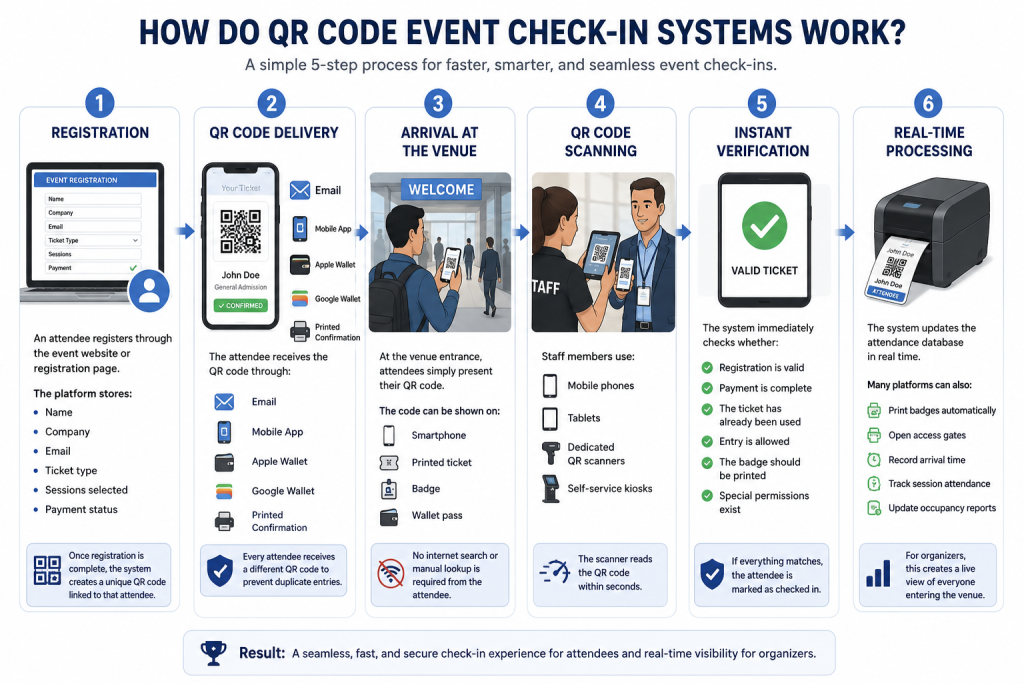
How Do QR Code Event Check-In Systems Work?
The complete process is simple, although several systems work together behind the scenes.
Step 1: Registration
An attendee registers through the event website or registration page.
During registration, the platform stores information such as:
- Name
- Company
- Ticket type
- Sessions selected
- Payment status
Once registration is complete, the system creates a unique QR code linked to that attendee.
Step 2: QR Code Delivery
The attendee receives the QR code through:
- Mobile ticket
- Event mobile app
- Apple Wallet
- Google Wallet
- Printed confirmation
Every attendee receives a different QR code to prevent duplicate entries.
Step 3: Arrival at the Venue
At the venue entrance, attendees simply present their QR code.
The code can be shown on:
- Smartphone
- Printed ticket
- Badge
- Wallet pass
No internet search or manual lookup is required from the attendee.
Step 4: QR Code Scanning
Staff members use:
- Mobile phones
- Tablets
- Dedicated QR scanners
- Self-service kiosks
The scanner reads the QR code within seconds.
And then the system immediately checks whether:
- Registration is valid
- Payment is complete
- The ticket has already been used
- Entry is allowed
- The badge should be printed
- Special permissions exist
Step 5: Instant Verification
If everything matches, the attendee is marked as checked in.
The system updates the attendance database in real time.
Many platforms can also:
- Print badges automatically
- Open access gates
- Record arrival time
- Track session attendance
- Update occupancy reports
For organizers, this creates a live view of everyone entering the venue.
Read More: Faster Onsite Experiences in 2026 with QR Code Event Check-In: The Complete Guide
What Are the Benefits of QR Code Event Check-In?
The biggest reason organizers choose QR code check-in is speed.
Registration is often the busiest area during the first hour of a conference or trade show. When hundreds or even thousands of attendees arrive within a short period, manual verification quickly creates long queues. With QR code scanning, staff no longer need to search through attendee lists or type names into a computer. A quick scan verifies the registration almost instantly, allowing attendees to move directly into the venue.
This faster process also creates a better first impression. Instead of starting the day in a long line, attendees can spend more time visiting exhibitors, attending keynote sessions, or networking with other participants.
1. Better accuracy with fewer manual errors
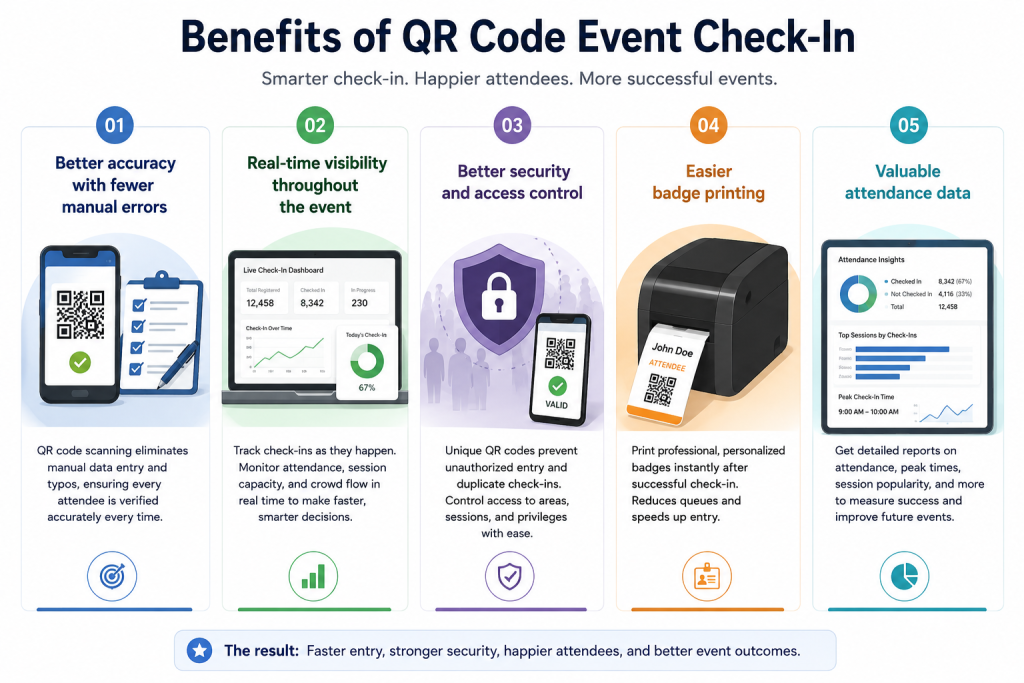
Manual registration always leaves room for mistakes. Staff may select the wrong attendee with a similar name, accidentally check in someone twice, or enter incorrect information while updating records.
QR codes remove most of these issues because every attendee receives a unique code connected to a single registration record. The software immediately identifies whether the attendee is registered, whether the ticket has already been used, and whether access should be granted. Accurate data becomes especially important after the event when organizers prepare attendance reports or measure event success.
2. Real-time visibility throughout the event
QR code check-in is not only about getting people through the entrance. Every scan updates the event dashboard immediately, giving organizers a live view of attendance. Instead of waiting until the event ends, organizers can see how many attendees have already arrived, which sessions are attracting the largest audiences, and whether additional staff is needed at certain entrances.
For multi-day conferences, this information helps event teams make operational decisions throughout the day rather than relying on assumptions.
3. Better security and access control
Security is another major advantage.
Since every QR code is unique, unauthorized visitors cannot simply walk into restricted areas. If someone tries to use the same QR code twice, most event management systems immediately detect the duplicate scan. Many conferences also assign different access levels based on ticket type. For example, exhibitors, speakers, sponsors, VIP guests, media representatives, and general attendees may all have different permissions. QR code systems automatically verify these permissions during check-in without requiring staff to remember individual rules.
4. Easier badge printing
Many conferences combine QR code check-in with on-demand badge printing.
As soon as the attendee’s QR code is scanned, the badge printer automatically prints a personalized badge with the attendee’s name, company, designation, QR code, or RFID chip if required. This removes the need to print thousands of badges in advance and makes it much easier to handle last-minute registrations or changes.
5. Valuable attendance data
Every check-in creates useful information.
Instead of simply knowing how many people registered, organizers gain a much clearer understanding of actual attendance. They can compare registrations with arrivals, identify peak entry times, calculate no-show rates, and measure participation across different sessions. These reports become valuable when planning future events because they show exactly how attendees behaved rather than relying on estimates.

How Do You Set Up a QR Code Event Check-In?
A successful QR code check-in experience begins long before attendees arrive at the venue. The technology is important, but planning is what determines whether registration runs smoothly on event day.
Choose the right event registration platform
The first step is selecting an event registration platform that supports QR code generation and real-time attendee management.
For conferences and trade shows, organizers should also look for features such as badge printing, mobile scanning, access control, session tracking, exhibitor registration, and live reporting. These capabilities become increasingly important as event size grows.
A platform designed for large events should also be able to handle thousands of registrations without slowing down during peak check-in hours.
Build a simple registration process
Registration should collect only the information needed for the event. Very long registration forms often discourage people from completing their registration. Asking only relevant questions improves the registration experience while keeping attendee records clean and easier to manage. Once registration is complete, the system automatically generates a unique QR code for every attendee.
Deliver QR codes before the event
Attendees should receive their QR codes well before event day. Most organizers send confirmation emails immediately after registration and then send reminder emails a few days before the event. This gives attendees enough time to save the QR code on their phone or print a copy if they prefer. Some platforms also allow attendees to store their tickets in Apple Wallet or Google Wallet, making access even easier.
Test every part of the system
Testing is one of the most important steps, yet it is often overlooked. Before the event opens, organizers should verify that scanners are reading QR codes correctly, badge printers are functioning properly, internet connectivity is stable, and all registration data is syncing correctly. It is also worth testing unusual situations such as duplicate scans, invalid QR codes, cancelled registrations, VIP access, and walk-in registrations.
Finding these issues before attendees arrive is far easier than fixing them during a busy registration period.
Prepare the registration team
Technology alone cannot deliver a smooth check-in experience. Registration staff should understand how to scan QR codes, search for attendees manually when needed, reprint badges, assist walk-in visitors, and answer common attendee questions. When staff know exactly what to do, even unexpected situations can usually be resolved within a few minutes without affecting the overall registration flow.
Always prepare a backup plan
Even well-planned events should prepare for technical problems.
Internet connectivity may become unstable. A scanner may stop working. An attendee’s phone battery may die just before reaching the registration desk. Having offline attendee lists, spare scanning devices, backup printers, charging stations, and manual search options ensures that registration can continue even if something unexpected happens. Experienced event organizers rarely depend on a single device or a single internet connection because reliable backup plans keep operations running smoothly under almost any condition.
When Should You Use QR Code Event Check-In?
QR code check-in is suitable for almost any event where attendee verification needs to be quick and accurate. Small seminars can benefit from it because it reduces administrative work. Mid-sized conferences use it to improve the attendee experience, while large trade shows depend on it to manage thousands of visitors entering the venue within a limited time.
It is particularly valuable for:
| Event Type | Why QR Code Check-In Works Well |
| Conferences | Fast attendee verification and badge printing |
| Trade Shows | Manages high visitor volumes throughout the day |
| Exhibitions | Tracks visitor attendance and exhibitor access |
| Corporate Events | Improves security and attendance reporting |
| Training Programs | Records participant attendance accurately |
| Association Meetings | Simplifies member verification |
| Government Events | Supports controlled entry and audit records |
| Multi-day Events | Prevents duplicate entries and tracks daily attendance |
As attendance grows, the value of QR code check-in becomes even more noticeable. An event with a few hundred attendees may still manage with manual registration, but conferences welcoming several thousand participants benefit significantly from automated check-in, live reporting, and digital access control.
The system also becomes more useful when organizers want to combine registration with badge printing, session tracking, networking, lead retrieval, or access to restricted areas.
For modern conferences and trade shows, QR code check-in is no longer just a faster alternative to paper lists- it has become an important part of efficient event operations.
Read More: 7 Common Mistakes to Avoid When Using QR Codes for Event Check-in
Conclusion
The way attendees enter an event shapes their first impression. A fast, organized check-in process creates confidence, while long queues and manual searches can affect the overall experience before the event has even started.
QR code event check-in solves many of the common problems associated with traditional registration. It verifies attendees in seconds, reduces manual errors, improves security, and gives organizers real-time attendance data that supports better decision-making throughout the event.
However, technology alone is not enough. Success depends on choosing the right registration platform, testing equipment before the event, training staff, and preparing backup plans for unexpected situations.
Whether you’re organizing a conference for 1,000 attendees or a trade show with tens of thousands of visitors, QR code check-in provides a practical, reliable, and scalable way to keep registration fast and organized while delivering a better experience for everyone involved.
FAQs
When attendees register for a conference, they receive a unique QR code by email, SMS, or an event app. At the venue, staff scan the code using a mobile device or scanner to verify the registration instantly. Once verified, the attendee is checked in, and the system can also print a badge or grant access to specific areas.
Yes, for most conferences and trade shows. QR code check-in is faster, more accurate, and easier to manage than manual registration. It reduces waiting time, minimizes data entry errors, and gives organizers real-time attendance reports that paper-based methods cannot provide.
Yes. Many professional event registration platforms support offline check-in. If the internet goes down, the scanner continues verifying attendees using locally stored registration data. Once the connection is restored, the attendance records automatically sync with the central database.
How long does it take to check in an attendee using a QR code?
In most cases, scanning a QR code takes only a few seconds. If badge printing is included, the entire process usually takes 5 to 15 seconds, depending on the printer and event setup.
Yes. Most attendees simply open the QR code from their confirmation email, event app, or digital wallet and present it for scanning. Printing the QR code is optional unless the organizer requests a printed copy.
Event staff can usually search for an attendee by name, email address, phone number, or registration ID. After verification, they can resend the QR code or check the attendee in manually if necessary.
Yes. Each attendee receives a unique QR code linked to their registration record. Most event platforms automatically detect duplicate scans, invalid tickets, and unauthorized entries. Some systems also support photo verification and role-based access control for additional security.