



Table of Contents
Table of Contents
TL;DR
Model Context Protocol (MCP) is a standardized way for AI applications to interact with external tools, systems, and data. For event management, this could make it easier for AI assistants to access approved information from registration, check-in, attendee management, reporting, and other event systems. MCP does not replace event software or APIs; it provides a structured way for AI applications to work with connected tools.
Introduction
Event organizers often work across several systems to manage one event. Registration may happen in one platform, attendee information may sit in another system, and check-in, session attendance, communication, and reporting may involve additional tools.
This makes simple questions surprisingly time-consuming. An organizer may need to open multiple dashboards just to find out how many attendees have registered, who has checked in, or which sessions are filling up.
This is where Model Context Protocol (MCP) becomes relevant. MCP for event management provides a standardized way for AI applications to interact with external tools and data sources. In event management, it could allow an AI assistant to work with approved event systems and return useful information through natural-language questions.
This guide explains what MCP is, how it works, where it can fit into event technology, and what organizers should consider before using it.
What Is Model Context Protocol (MCP)?
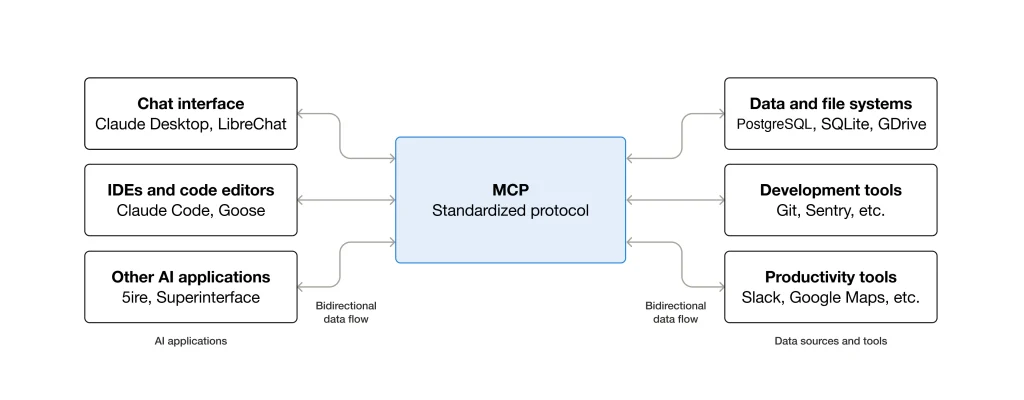
Model Context Protocol (MCP) is an open protocol that provides a standardized way for AI applications to connect with external tools, resources, and data.
In simple terms, think of MCP as a common connection method between an AI application and the systems it is allowed to work with.
For example, an event organizer might ask:
“How many people have registered for the conference?”
The AI assistant needs access to the relevant registration information to answer that question. An MCP-based setup can provide the assistant with an approved tool for retrieving that information from a connected system.
MCP itself is not an event registration platform, database, or AI assistant. It provides the framework through which an AI application can interact with connected systems.
Some important MCP concepts include:
- MCP host or client: The AI application that uses MCP.
- MCP server: Connects the AI application to specific tools or information.
- Tools: Actions or functions that an AI application can use, such as retrieving approved event information.
- Resources: Information that an MCP server can make available to the AI application.
For event organizers, the important idea is that MCP can help AI applications interact with approved event technology in a more standardized way.
How Does MCP Work?
The basic process can be understood in four steps:
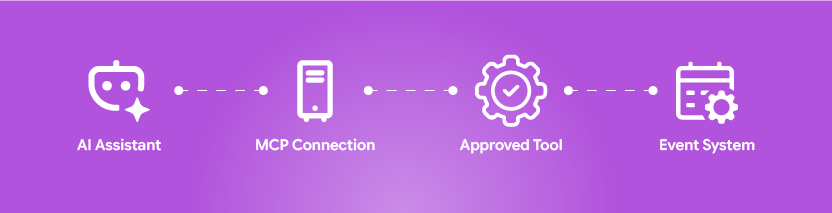
| Steps | Explanation |
| 1. AI Assistant | Understands the user’s request and identifies what information is needed. |
| 2. MCP Connection | Connects the AI assistant to the appropriate external system or service. |
| 3. Approved Tool | Uses a permitted tool to retrieve the required information. |
| 4. Event System | The connected system processes the request and sends the result back to the AI assistant. |
Suppose an organizer wants to know how many attendees have checked in.
Instead of manually opening a check-in dashboard, searching for the relevant report, and interpreting the numbers, an AI assistant could send the request through an appropriate MCP tool.
The connected system returns the relevant information, and the assistant presents the result in a conversational format.
For example:
Organizer: “How many registered attendees have checked in so far?”
AI assistant: “1,842 of 2,300 registered attendees have checked in.”
The exact workflow depends on the systems being connected, the MCP implementation, and the permissions given to the tools.
MCP does not automatically give an AI assistant access to every system in an organization. The relevant tools and connections have to be deliberately configured.
Why Does MCP Matter for Event Management?
Event technology has become increasingly connected, yet event teams still spend considerable time switching between platforms and searching for information.
A single conference might involve systems for:
- Event registration
- Ticketing
- Attendee management
- Badge printing
- Check-in
- Session management
- Event apps
- CRM
- Communication
- Analytics and reporting
The challenge is not always a lack of data. Often, the challenge is getting the right information at the right time.
MCP could make this interaction more accessible by allowing an AI application to work with approved tools through a common protocol.
For example, instead of asking a team member to check three systems and prepare an update, an organizer could potentially ask an AI assistant to retrieve information from the appropriate connected tools.
This is one reason MCP-powered event management workflows can be useful to explore. The value is less about replacing existing event technology and more about making approved information and workflows easier to interact with.
How Can MCP Be Used in Event Technology?
The potential applications of MCP for event technology depend on what systems and tools are connected. Some examples include:
Before the event
MCP could potentially help an AI assistant retrieve information about registrations, attendee categories, speakers, sessions, or event schedules.
For example:
- How many VIP attendees are registered?
- How many registrations were received this week?
Note: These are information-retrieval tasks. The AI assistant would need access to the relevant tools and data to answer them.
During the event
MCP could support operational questions involving check-in, attendance, sessions, or other connected event information.
An event operations team might ask:
- How many attendees have checked in?
- Which sessions have the highest attendance so far?
- How many registered attendees have not arrived?
Note: Instead of manually searching through dashboards, the organizer could receive the information through an AI interface if the required tools are available.
After the event
MCP could also support access to information needed for post-event reporting.
An organizer could potentially ask:
- Summarize today’s attendance figures.
- How many registered attendees attended the event?
- What was the attendance by session?
Again, these capabilities depend on the underlying event systems, data quality, permissions, and MCP tools.
How Could MCP Support Event Registration and Check-In?
Registration and check-in generate a large amount of operational information.
A registration system may contain attendee names, ticket types, categories, registration status, and other event information. A check-in system may record whether an attendee has arrived and when they entered.
With an appropriate MCP implementation, an AI assistant could potentially query these systems.
For example:
- How many people registered for the event?
- How many have checked in?
- How many VIPs have arrived?
- Which registered attendees have not checked in?
This could make information easier for event teams to access without requiring them to manually search different interfaces.
However, retrieving information and changing information are different things. A read-only tool might allow an assistant to view check-in data, while changing an attendee’s registration status would require a separate action, appropriate permissions, and potentially human approval.
How Can MCP Simplify an Event Organizer’s Workload?
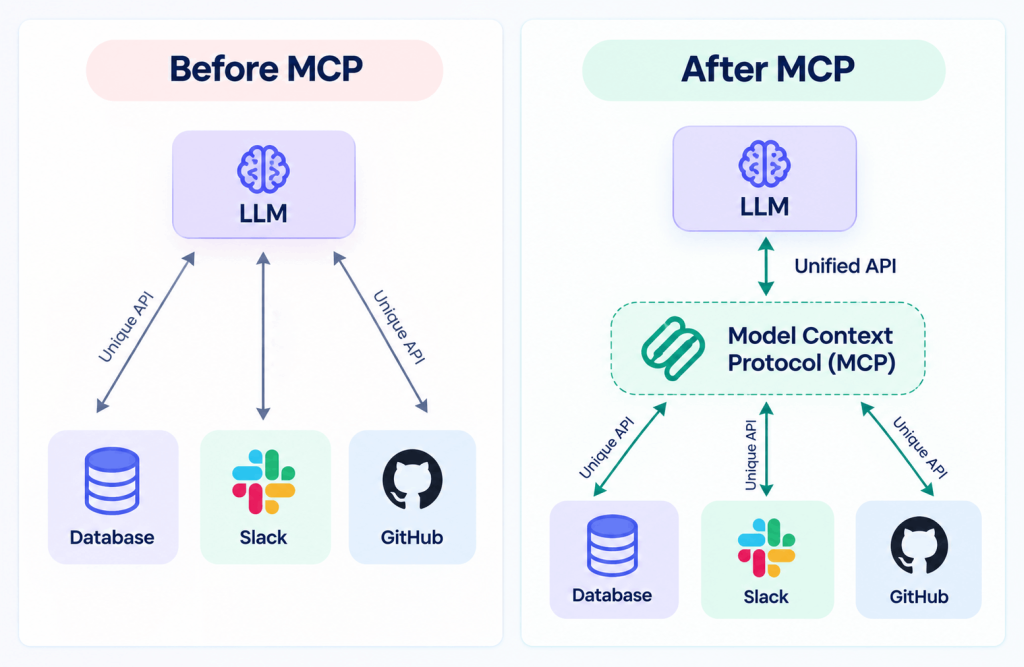
MCP is useful for event organizers because it allows an AI assistant to connect with approved systems and access the information stored in them. Instead of relying only on what the AI already knows, it can use authorized tools to get up-to-date information and provide more relevant answers.
Consider a common situation.
An organizer asks:
How many registered attendees haven’t checked in yet?
Without a connected workflow, someone may need to open the registration system, open the check-in system, compare the information, and calculate the difference.
With an appropriate MCP setup, the AI assistant could use authorized tools to retrieve the relevant information and provide the answer.
This could reduce repetitive information searches and make event data easier for teams to access.
It could be particularly useful for event operations teams that need frequent updates throughout a busy conference, exhibition, or large-scale event.
Note: The goal is not to remove people from the workflow. Human teams would still decide what information should be accessed, what actions are permitted, and how important operational decisions are made.

MCP vs APIs for Event Technology: What’s the Difference?
MCP and APIs are related to software connectivity, but they serve different purposes.
| Aspect | API | MCP |
| Purpose | Allows software systems to communicate with each other. | Allows AI applications to interact with tools and resources. |
| Main Use | Exchanges data between applications. | Helps AI access and use connected systems. |
| Example | Retrieves attendee registration data. | AI asks for the number of checked-in attendees. |
| Users | Mainly used by developers and applications. | Mainly used by AI assistants and AI applications. |
| Communication | Uses predefined endpoints and requests. | Provides a standardized way for AI to discover and use tools. |
| Relationship | Can provide the underlying connection to an event platform. | Can use existing APIs to access event systems. |
| In Event Technology | Connects event platforms with other software. | Helps AI assistants work with event technology through approved tools. |
An API (Application Programming Interface) allows software systems to communicate with each other. For example, an event platform might provide an API that allows another application to retrieve registration information.
MCP for event management provides a standardized way for AI applications to interact with tools and resources.
In an event technology environment, an MCP server could potentially use existing APIs behind the scenes to communicate with an event platform.
So MCP does not simply replace APIs. They can work together.
How Does MCP Work With AI Assistants for Event Management?
AI assistants are particularly relevant to MCP because they can provide a natural-language interface for interacting with connected tools.
Instead of navigating a system manually, an organizer could ask:
How many attendees checked in during the first two hours?
Or:
Show me the number of attendees registered in each ticket category.
The AI assistant interprets the request, uses an appropriate connected tool, receives the available information, and presents it in a readable format. This can make complex event information easier to access for people who may not want to navigate technical dashboards or databases.
Note: However, the AI assistant should only have access to the tools and information it is authorized to use. For sensitive or high-impact actions, human review may also be appropriate.
What Security and Data Protection Issues Should Event Organizers Consider?
Event systems can contain personal and operational information, including attendee names, contact details, registration records, ticket information, and attendance data. Connecting these systems to AI therefore requires careful access control.
Organizations should consider:
- Which data an AI assistant can access
- Which tools it can use
- Whether access is read-only or allows actions
- Who is authorized to use those tools
- Whether sensitive information is necessary for the requested task
- How access and activity are monitored
- Whether important actions require human approval
The principle of least privilege is particularly important. An AI assistant should not receive broad access simply because it might be useful in the future.
MCP itself should not be treated as a guarantee of security. The security of an MCP-enabled workflow depends on the way the systems, tools, credentials, permissions, and data are configured.
What Are the Limitations of MCP for Event Management?
MCP can provide a useful connection layer, but it is not a complete event-management solution.
- First, an MCP connection does not automatically connect every event platform. The necessary MCP server, tools, and integrations must exist.
- Second, MCP does not replace event registration, ticketing, check-in, CRM, or other event software. Those systems still perform their core functions.
- Third, AI-generated responses need to be checked when accuracy matters. If the underlying event data is incorrect or incomplete, connecting it through MCP does not fix the problem.
- Finally, permissions remain important. An AI assistant should not be allowed to access or modify attendee information simply because the technology makes that interaction possible.
What Should Event Organizers Consider Before Using MCP?
Before implementing MCP, event teams should ask a few practical questions:
| Consideration | What Event Organizers Should Ask |
| Systems to Connect | Which event systems need to be connected? |
| Data Access | What information should the AI assistant be allowed to access? |
| Human Approval | Which actions should require human approval? |
| Permissions | What permissions should each tool have? |
| Data Quality | Is the event data accurate, complete, and well-structured? |
| Monitoring | How will access and tool activity be monitored? |
| Privacy | What privacy requirements apply to attendee information? |
| System Availability | What happens if a tool or connection becomes unavailable? |
| Implementation Approach | Can the team start with one small, clearly defined use case before expanding? |
Starting with a small, clearly defined use case can be more practical than trying to connect every event system at once.
In the End
Model context protocol provides a standardized way for AI applications to interact with approved tools, resources, and external systems. For event management, its potential lies in making information and selected workflows easier to access through AI assistants. It does not replace event technology or APIs. Instead, MCP can sit alongside existing systems and provide a structured way for AI applications to work with them. For event organizers, the most useful starting point is to identify repetitive information tasks, determine which systems need to be connected, and establish clear permissions and security controls before introducing MCP into operational workflows.
FAQs
MCP for event management refers to using Model Context Protocol to allow AI applications to interact with approved event technology tools and data. Depending on the implementation, this could include registration, check-in, attendee information, sessions, and reporting systems.
Yes, an MCP-based setup can potentially connect an AI application with an event registration system when an appropriate MCP server, tool, integration, and permissions are available. The exact information and actions available depend on the implementation.
No. APIs allow software systems to communicate, while MCP provides a standardized way for AI applications to interact with tools and resources. MCP and APIs can work together rather than being mutually exclusive.
Yes. AI assistants are one of the main contexts in which MCP can be useful. MCP can provide a structured way for an AI application to interact with approved external tools and information.
MCP should not automatically be considered secure simply because it is used. Organizations need appropriate authentication, authorization, permissions, data controls, monitoring, and other security measures when connecting AI applications to attendee information.
No. MCP is a protocol, not an event-management platform. Event registration, ticketing, check-in, attendee management, and other systems would continue to perform their respective functions while MCP could provide a way for AI applications to interact with selected tools or information.